
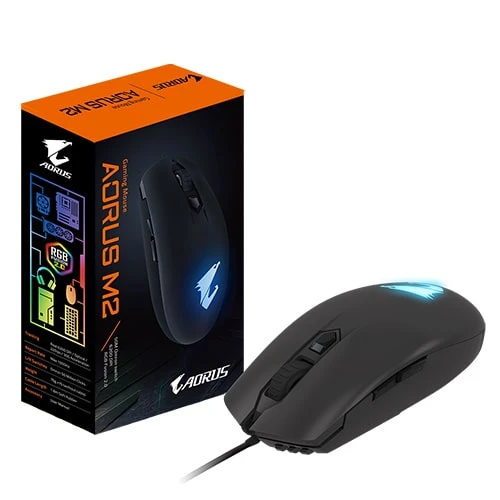
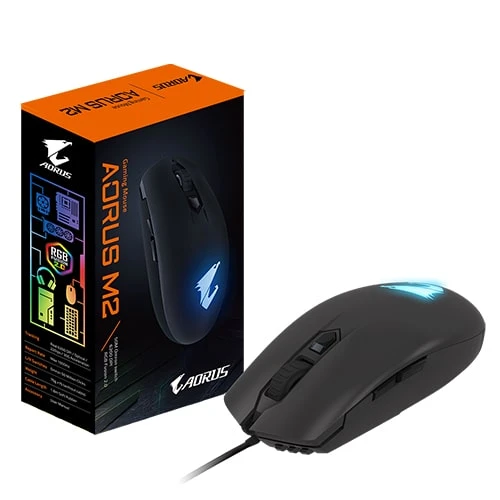
Gigabyte Aorus M2 7 Button Usb Rgb Gaming Mouse Black
❌ Out of Stock Save ৳250 (- 17)% SKU: IC--14297
Key Features
Warranty : 1 Year
🖱️ What is the Aorus M2 — Overview & Purpose
The Aorus M2 is a wired USB gaming mouse from GIGABYTE’s Aorus line, designed to deliver reliable performance, light weight, and enough customization to suit gaming and everyday PC use. It aims to strike a balance — not a high-end pro-gaming mouse with premium sensor and ultra-high DPI, but a competent, affordable device that handles casual to mid-range gaming, office work, and general computer usage well.
With a modest shape, RGB lighting, and a sensor that’s good enough for most games, the Aorus M2 is often considered a great “starter” or “mid-tier” gaming mouse — especially if you care about lightweight feel and decent responsiveness without breaking the bank.
⚙️ Key Specifications & Build Quality
Here’s a breakdown of the main technical specs of Aorus M2:
-
Connection: Wired — USB interface, 1.8 m matte-black PVC cable.
-
Sensor: Optical sensor — specifically the Pixart 3327 gaming sensor.
-
Sensitivity / DPI Range: Adjustable from 200 to 6200 DPI, in 100-DPI increments (default presets include 400 / 800 / 1600 / 3200 DPI).
-
Polling Rate (Report Rate): 125 / 500 / 1000 Hz — giving flexibility depending on your PC setup and gaming needs.
-
Acceleration / Max Tracking: Up to 30G acceleration, and maximum tracking speed around 220 inches/second — adequate for most FPS, MOBA, or general games.
-
Switches: Uses Japanese Omron switches for left/right buttons, rated for up to 50 million clicks, which helps with durability and consistent click feel.
-
Buttons: 7 programmable buttons — including the standard left/right click + scroll wheel + 2 side (thumb) buttons on each side — giving extra control and flexibility for gaming or productivity.
-
Design & Ergonomics: The mouse has an ambidextrous shape (so it can be used by both right- and left-handed users), and is designed for palm or claw grip styles. Its dimensions are approximately 117 mm (length) × 63 mm (width) × 36 mm (height), and weight around 76 g ±5% — making it quite lightweight and easy to maneuver.
-
Lighting: RGB lighting (via “RGB Fusion 2.0”) — adding aesthetic appeal and compatibility with other Aorus-brand RGB RGB components.
-
Cable: A reasonably long (1.8 m) cable that gives desk flexibility while avoiding tangling.
🎯 Performance — What to Expect in Real Use
Responsive and Accurate Tracking
Thanks to the Pixart 3327 sensor, adjustable DPI, and decent acceleration specs, the mouse can handle a variety of tasks — from everyday browsing or office work to gaming (FPS, MOBA, etc.). For many games and general tasks, 6200 DPI and 30G acceleration are more than sufficient.
Lightweight and Agile
At ~76 g, the Aorus M2 is considerably lighter than many bulky gaming mice. That light weight, combined with its smallish profile and ambidextrous design, makes it easy to move quickly — useful for fast mouse flicks in shooters, or for long sessions without fatigue.
Customizability (to a degree)
Because the 7 buttons are programmable, you can remap them for macros, shortcuts, in-game commands, or productivity workflows. On-the-fly DPI switching is also handy — you can quickly adjust sensitivity depending on what you’re doing (e.g. high DPI for broad movement, lower for precision aiming).
Durability & Build Quality
With Omron switches rated for up to 50 million clicks and a sturdy build, the Aorus M2 is built to last — likely to survive months or years of daily use, even with heavy clickers. The cable and build specs are standard but sufficient for regular desktops or gaming rigs.
Looks & Aesthetics
The RGB lighting and matte-black finish help the mouse fit into gaming setups or RGB-equipped rigs. For many users building a themed PC (e.g. matching Aorus components), the M2’s design adds aesthetic value beyond mere utility.
✅ Who This Mouse Is Best For — Use Cases & Strengths
The Aorus M2 is particularly well-suited for:
-
Casual to mid-level gamers — shooters, MOBAs, action or RPGs where you want decent sensor performance, quick movement and reliable clicks without overspending.
-
Budget-conscious builds — for a good performing gaming mouse without paying premium prices for top-tier models.
-
Users who like light, agile mice — the lightweight design makes it great for fast-paced movement, reducing fatigue, and improving agility.
-
General desktop/work use — programming, browsing, office work, content creation — thanks to its ergonomic, ambidextrous build and programmable buttons.
-
PC builders with RGB setups — those who care about aesthetics: the RGB lighting lets it blend well with other lit-up components, giving a coordinated look.


Total : 0.00
Write a Review