
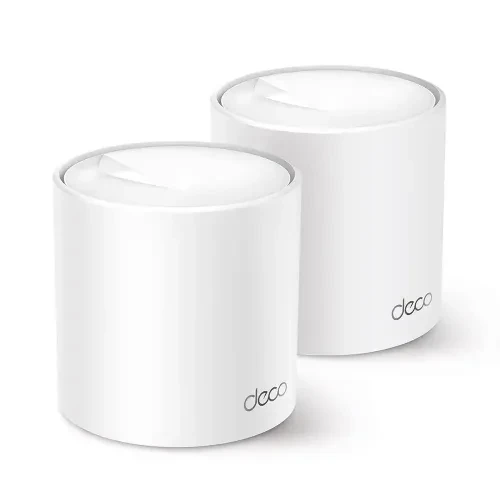
Tp-Link Deco X50 Ax3000 Dual Band Mesh Router 2-Pack
✅ Available Save ৳700 (- 6)% SKU: IC--14034
Key Features
Warranty : 1 Year
📶 What is the Deco X50 (2-Pack) — Overview & Purpose
The Deco X50 is a mesh-WiFi system from TP-Link, using the modern Wi-Fi 6 (802.11ax) standard. The “2-Pack” bundle gives you two identical router-units (Deco nodes), which work together to create a single unified Wi-Fi network covering a larger area than a standalone router. This is ideal for medium-to-large homes, multi-room apartments, small offices, or spaces with Wi-Fi dead zones where one router’s signal alone isn’t enough.
Because both units work in “mesh mode,” they communicate with each other (wirelessly or via wired backhaul) and seamlessly handle device roaming — so when you move around your home or office, your phone, laptop, or tablet automatically connects to whichever node gives the best signal, using a single Wi-Fi name (SSID).
⚙️ Technical Specs & Key Features
-
Wi-Fi Standard: Wi-Fi 6 (802.11ax), Dual Band (2.4 GHz + 5 GHz)
-
Maximum Speed (theoretical): Up to AX3000 — 2402 Mbps on 5 GHz + 574 Mbps on 2.4 GHz.
-
Coverage (2-Pack): Up to approximately 4,500 sq. ft (≈ 420 m²), suitable for a 3-4 bedroom house or similar-sized apartment.
-
Capacity: Designed to support many devices (150+), useful for households with multiple smartphones, laptops, smart TVs, smart devices (IoT), streaming devices, etc.
-
Mesh Technology: Uses TP-Link’s “AI-Driven Mesh” to intelligently manage connections between nodes and devices, dynamically optimizing paths for best signal and minimal interference.
-
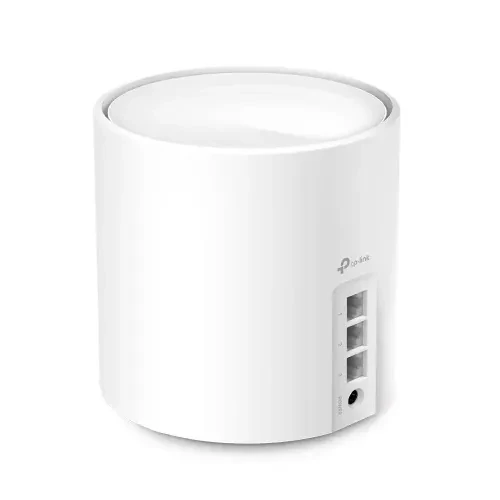
Multiple-LAN Ports: Each Deco unit includes 3 × Gigabit Ethernet ports (1 WAN/LAN + 2 LAN) — useful for wired devices (PCs, game consoles, smart TVs) or for using wired backhaul for more stable node-to-node connection.
-
Wi-Fi 6 Features: Includes OFDMA, MU-MIMO, Beamforming, and BSS-Color — technologies that improve throughput, reduce latency, avoid interference, and better serve many devices simultaneously.
-
Security & Network Control: Comes with built-in security through TP-Link’s HomeShield: network-level protections, parental controls, guest network support, device management, and more.
-
Flexible Operation Modes: Works as a router or in Access Point mode — useful if you want to integrate into existing network setups.
-
Easy Setup & Management: Uses the “Deco” mobile app (iOS/Android) to guide setup and manage the network — adding new nodes, checking device list, controlling bandwidth, setting up guest network, etc. Simple even for non-technical users.
🏠 Real-World Benefits & Use Cases
✅ Seamless Full-Home Wi-Fi Coverage
With two Deco X50 units, you can eliminate dead zones in larger homes or offices. That means strong Wi-Fi in bedrooms, living rooms, kitchen, even balconies — no more weak signal or repeated “Wi-Fi not found” situations as you walk around.
✅ Smooth Multi-Device Performance
Thanks to Wi-Fi 6 + OFDMA + MU-MIMO + Beamforming, the network handles many devices simultaneously with good performance. Great for modern households where phones, tablets, smart TVs, laptops, smart devices, cameras — all stay connected.
✅ Stable Internet for Streaming & Gaming
High throughput and stable connections make 4K streaming, online gaming, video calls, large downloads/uploads — all feasible without noticeable lag or buffering, even if multiple devices are active.
✅ Easy Setup & Low Maintenance
The Deco app makes setup and management straightforward. You don’t need technical know-how — plug in the main node, link via app, place the second node in another room, and you’re done. Adding more nodes later is also easy.
✅ Flexibility for Wired or Mixed Setups
If you have desktops, smart TVs, or want stable wired backhaul between nodes, the Gigabit Ethernet ports give flexibility. For example: you can keep one Deco wired to the modem and use the second as a pure wireless node elsewhere.
✅ Security & Family Controls Built-In
HomeShield helps manage connected devices, implement parental controls or guest networks — important if you have children, guests, or many IoT devices that need extra protection.
⚠️ Limitations & What to Know
-
Theoretical speeds vs real-world performance: 2402 Mbps on 5 GHz + 574 Mbps on 2.4 GHz are maximum physical-layer rates. Actual throughput will vary depending on device capabilities, interference, wall thickness, distance, and internet plan.
-
Gigabit Ethernet cap: Although Wi-Fi 6 supports high wireless speeds, the wired ports are Gigabit (1 Gbps) only — so if you have a super-fast 2.5 Gbps fiber plan, wired devices will still be capped at ~1 Gbps. This is a common limitation in many mesh routers. (Users in community threads report this when trying to exceed 1 Gbps over LAN)
-
Mesh wireless backhaul compromises bandwidth: If the two Deco units communicate wirelessly (instead of via Ethernet), mesh backhaul reduces some wireless bandwidth — so placing the secondary unit at optimal distance matters. For multi-storey homes or thick walls, wired backhaul is often recommended for best performance.
-
Speed depends on client devices: To benefit fully from Wi-Fi 6 speeds (HE160, MU-MIMO, OFDMA), your devices must also support Wi-Fi 6. Older devices will still work — but with lower speeds.
-
Potential software quirks: Some users report occasional issues needing reboot — network resets, firmware glitches, or mesh node communication hiccups. While not universal, this is worth noting if you expect “always-on” stability.



Total : 0.00
Write a Review